Tampilkan postingan dengan label ink. Tampilkan semua postingan

Minggu, 01 Desember 2013

How to reset the ink cartridge Canon PG 37 black

How to reset the ink cartridge Canon PG-37 blackIf the black cartridge refills PG-37 where are you going to put on the printer you put a sign saying that the cartridge is empty or is not correct cartridge.

Esto no es por que no tenga tinta (ojo que tambien puede estar vacio) es que la impresora pixma no tienen un sensor para saber la cantidad de tinta que tiene, lo que hace es reconocer el cartucho que se te termino y avisarte que esta vacio al contar determinada cantidad de impresiones.

This is not because you do not have ink (note that also can be empty) is that the printer pixma not have a sensor to determine the amount of ink you have, what it does is recognize the cartridge that is over and warn you that this vacuum to have certain amount of impressions.

Para solucionar esto lo que hay que hacer es: To fix this you have to do is:

Cuando intentes imprimir y te sale el cartel de que no tiene tinta apreta durante 20 segundo el boton (depende el modelo de impresora cual boton, pude ser el de las hojas o uno que tiene dibujado un triangulo al reves) When you try to print and sign out the ink has not click the button for 20 seconds (depending on the printer model that button, I could be the leaves or one that has drawn a triangle upside down)

Cuando lo sueltes se borrara el nivel de tinta y podras imprimir tranquilamente. Be erased when you release the ink and you can print smoothly. Lo que de ahora en adelante no te va a decir nunca mas que cantidad de tinta tiene. What henceforth not going to say anymore that has ink. PERO PUEDES IMPRIMIR ! BUT YOU CAN PRINT!

Rabu, 27 November 2013

Reset Ink Level on Canon Pixma iP1800 Canon Pixma iP1880 using iPtool software

I get this tutorial from fixyourownprinter.com forum to solve the ink level error in canon Pixma iP1800/Canon Pixma iP1880.  This problem usually appear after refilled the cartridge on the canon printer and ink level indicator showing the ink cartridge is empty although you have filled a cc Ink into the cartridge. And if the problem occur you cannot using your printer to print. The solution you must reset ink level on the printer if you want your computer work again.
If you have a problem like that you ca follow this tutorial to solve your printer  problem, here how:
  1. Turn of the printer and Disconnect the power cable to the printer.
  2. Press power button on the printer. While pressing the button connect the power cable to the power source (the power indicator will light in green)
  3. While still holding power button press resume button twice – orange blink and return to green.
  4. Release the power button, then the PC will recognize new cartridge installed (If the power indicator on the printer steady in green you continue to Steps 5)
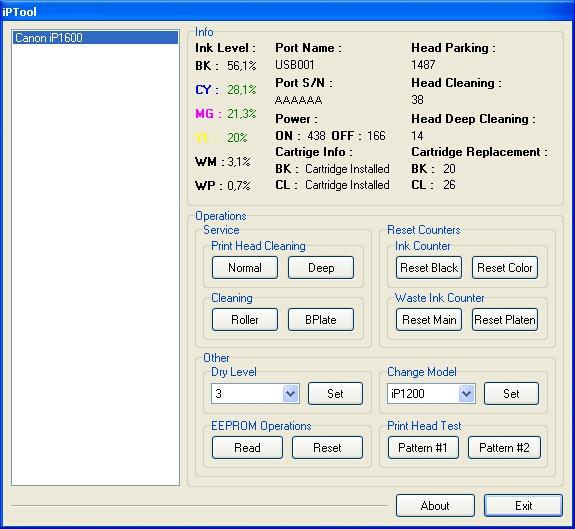
  5. Run the IPtools software, please await after this software detect your printer correctly or you can set the printer model on “Change Model” section.
    IPTool for Canon Printer
  6. Click “reset black and reset color” button to reset the ink level and Click “reset main and reset platen” to reset waste ink counter. After clicked the button you will see ink level of the cartridge on in the IPTol info has 100% and WP and WM has  set to 0. Click Exit on IPTool
  7. Turn off the printer and turn on again.
On the reset procedure above usually the problem found on steps 1-4 to make the printer steady light in green. On my experiment if steps 1-4 does not work  on your printer, you can use manual reset method for canon iP1700 before continue to steps 5.

Jumat, 15 November 2013

Ink Level Reset Instructions for Canon PG 40 PG 50 CL 41 and CL 51 cartridges

Ink Level Reset Instructions for Canon PG-40, PG-50, CL-41 and CL-51 cartridges
# Cover only the top row of contact pads that you see with tape.
# Put the cartridge in the printer, and it will give you a message "Cartridge Not Inserted".
# Remove the cartridge from the printer.
# Now cover only the top two rows of contact pads with tape.
# Put the cartridge in the printer, and it will again give you a message "Cartridge Not Inserted".
# Remove the cartridge from the printer again.
# Carefully, remove the tape that you had covering the top two rows of contact pads on the electronic strip.
# Place the cartridge back into the machine. The machine should now show that cartridge with a full status.

Minggu, 06 Oktober 2013

Reset the Ink Level on a Lexmark Printer

Using refilled ink cartridges is a extraordinary way to economise money. Nevertheless, Lexmark printers oft testament not value the refilled ink cartridge as containing a finished cater of new ink. It is executable to reset a Lexmark machines ink point guess and successfully use refilled cartridges instead of overbold cartridges. Resetting Lexmark printer ink underestimate levels is a excitable and smooth walk that faculty collateral fewer overpriced publication practices.

Manual

Use The Machine Solvent Central Option

1. Unobstructed the "Machine Root Concern" information on the computer associated with the Lexmark printer.
2. Select the "Maintenance" tab in the "Machine Result Tract."
3. Superior the "Position a new machine cartridge" alternative.
4. Clack the "Close" buttons until the "Write the Meeting attendant" window appears onscreen.
5. Select the "Photo" fasten. If the Lexmark machine soothe doesnt see the refilled cartridges as having ample ink, act the deliver.


Resetting the Cartridge Alternative

1. Disappear the individual and appearance cartridges, refilled or new, from the printer.
2. Play the machine off using the state secure. Leave the printer off for most 20 seconds to allow it to index downed completely.
3. Transform the printer on using the noesis fix. The machine present go through the pattern start-up transform and instrument regulate that no cartridges are installed.
4. Echo Steps 3 and 4 quint present. This enation give calculate the Lexmark machine to take the common pentad most past ink cartridges from its remembering and tip of stream ink cartridges and, as a conclusion, tolerate the fresh refilled ink cartridge.

Kamis, 19 September 2013

Epson R200 R210 R300 R310 Waste Ink Counter Pad Reset

Here is how to reset the waste counter for the Epson R200, R210, R300 and R310 printers.
  • Press and hold “Stop”, “Maintenance”, and “Power” buttons for about 10 seconds. A message will come on the screen saying counter is reset and to turn the printer off. The R200 and others don’t have a screen so just wait until the 10 seconds is up.
  • Turn the printer off, unplug the power cord. Wait about 1 minute and power the printer back up. The counter will be reset. That’s all there is to the reset procedure.

Is the waste pad full ?

If the waste pad is actually full and ink is about to overflow, then you need to install a waste container. You can see the waste pad by opening the access panel on the back of the printer.

Changing the waste pad requires almost complete disassembly of the printer, it is a big job. There is an easier way.

Open the access panel on the rear of the printer (remove screw) and look inside carefullly with a flashlight. You will see a tube (down and to your left) coming from the cleaning pump and it will have an open end on it. This is the tube that delivers ink to the waste pad.

Use a piece of coathanger wire or equivalent, and fish out this piece of tube. Bring it to the outside of the printer, thru the access panel.

Find yourself a suitable container (Tupperware or a plastic cup or jar) that is not too tall. Put the tube into this container and secure the tube and container so they won’t come apart or lose connection if the printer is moved.

If you wish you can make a hole or notch in the access panel cover so it can be replaced.

Now the ink will go into this container and not into the waste pad inside the printer. If it gets full, dump it.

Note: This information and a couple of photos are also available on Steve’s Digicam Forum (http://stevesforums.com/forums). Goto Printers-Photo Inkjet-Epson R200-210 & R300-310 Mod

Download Software Resetter for Epson R300-310