Tampilkan postingan dengan label and. Tampilkan semua postingan

Minggu, 24 November 2013

How to reset the protection counter of Epson Stylus TX410 and TX415 Resetter

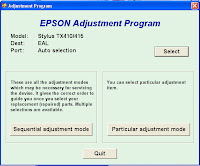
 Epson Stylus TX410 and TX415 Adjustment Program

FIX PRINTER ERROR "parts inside printer end service life, waste ink pad counter overflow error"

Please follow the steps below to reset the protection counter effectively.
  1. Double click AdjProg.exe.
  2. Click “Accept” button.
  3. Click "Select" button. and choose your printer model then click "OK"
  4. Click “Particular adjustment mode” button.
  5. Select on “Waste ink pad counter” and click “OK” button.
  6. Click on “Initialization” button and the program will reset the protection counter.
  7. Turn off the printer as a program instructed then turn on again.
  8. Click “Finish” button. and its done!
Download Here!

Sabtu, 23 November 2013

Download Canon PIXMA MX432 Office All in One Inkjet Printers Driver software tools and firmware


Download Canon PIXMA MX432 Office All-in-One Inkjet Printers Driver, software, tools, and firmware.

Get Printer Driver,
Product Installation Software,
Latest Firmware,

Utility
and Diagnostic Tools.
in the following links below.

Microsoft Windows 8 (32 bit)
Microsoft Windows 8 (64 bit)
Microsoft Windows 7 (32 bit)
Microsoft Windows 7 (64 bit)
Microsoft Windows server 2008 x64
Microsoft Windows server 2008 w32
Microsoft Windows Vista
Microsoft Windows Vista (64 bit)
Microsoft Windows XP
Mac OS X
Linux os

http://www.usa.canon.com/cusa/support/consumer/printers_multifunction/pixma_mx_series/pixma_mx432#DriversAndSoftware

Jumat, 22 November 2013

How to Print Test Page Pattern Canon Epson and HP Printers without CPU or Computer

Here how to test page pattern for some Canon, Epson and HP printer without Computer or CPU. Prepare paper on printer before test the printers.
A. Test page pattern for Epson Printer
For C series: C41, C42, C43, C45, C58, C61, C62, C63, C65, C67, C79, C85, C86, C87, etc.
For R series: R210, R230, R270, etc.
  • Push and hold paper/resume button and then push power button.
For CX Series like CX3500, CX3600, CX3700, CX 5100, CX4900, CX5900, etc
  • Push and hold power button, and then push ink button until indicator lamp blink once, and then release both of them.
B. Test page pattern for HP Printer
3600 series and 3700 series
  • Turn on printer, Wait until power indicator lamp stop blinking, then push and hold power button and then open and close again cover panel 3 or 4 times repeatedly.
HP37XX, HP39XX , D23XX , D24XX
  • Turn on printer , wait until power indicator lamp stop blinking then press power switch while opening the cover 5 times repeatedly then release switch button
Three in one Models
  • Switch on printer then press “cancel” and “color” at the same time
C. Test page pattern for Canon Printer
BJC 1000, BJC 2000, BJC 2100 SP, S100, S200
  • Push twice on resume button
IP 1200, IP 1300, IP 1600, IP 1700, IP 2200
  • Push 5 times on resume button
Source: http://www.duraklin.com

Jumat, 15 November 2013

Ink Level Reset Instructions for Canon PG 40 PG 50 CL 41 and CL 51 cartridges

Ink Level Reset Instructions for Canon PG-40, PG-50, CL-41 and CL-51 cartridges
# Cover only the top row of contact pads that you see with tape.
# Put the cartridge in the printer, and it will give you a message "Cartridge Not Inserted".
# Remove the cartridge from the printer.
# Now cover only the top two rows of contact pads with tape.
# Put the cartridge in the printer, and it will again give you a message "Cartridge Not Inserted".
# Remove the cartridge from the printer again.
# Carefully, remove the tape that you had covering the top two rows of contact pads on the electronic strip.
# Place the cartridge back into the machine. The machine should now show that cartridge with a full status.

Selasa, 12 November 2013

Adjustment Program Epson PM250 PM270 PM215 PM210 and PM G800 by OrTHoTaMiNe

OrTHoTaMiNe uploaded again adjustment program for Epson PIcture Mate (PM) Series that is adjustment program for  Epson Picture Mate PM210, PM215, Epson PM250, PM270 and PM-G800.  But I don’t know all of software resetter work fine or not because I don’t have these Epson printer PM serias to try this adjustment program.
If you are interested to try all the resetter or adjustment program on need software resetter to reset or repair the counter on your Epson Picture Mate. You can download the software from download link below:
  • Download Adjustment Program Epson PM270/ Epson Picture Mate 270
  • Download Adjustment Program Epson PM250/ Epson Picture Mate 250
  • Download Adjustment Program Epson PM215/ Epson Picture Mate 215
  • Download Adjustment Program Epson PM210/ Epson Picture Mate 210
  • Download Adjustment Program Epson PM-G800/ Epson Picture Mate D800
Note: There are no guarantees any damage caused by this software on your printer. Use this software as your own risk

Minggu, 22 September 2013

If you want printer repairs and you need about adjustment program

if you want printer repairs and you need about adjustment program.
adjustment program ...

for epson c58, c79, c87, c67, cx 2800, cx 4900, cx5900, r270,
Tags: free epson c87 plus resetter software, resetting programme for epson cx 2800,
reset epson stylus c87, jual printer epson stylus c79,
download installer epson stylus c58, free resetter epson stylus c87 plus, free adjustment program

http://reset-epson-resetter.blogspot.com/