Tampilkan postingan dengan label epson. Tampilkan semua postingan

Sabtu, 30 November 2013

RESETTER PRINTER TUTORIAL T20 Epson Stylus PHOTO

Before using the Software Resetter Epson Stylus T20, make sure:
a. Epson Stylus T20 Printer Driver is installed first, and make sure the printer is connect to the computer
b. Make sure you have the "Software Resetter Printer Epson Stylus T20"
c. Make sure that the damages requested in the printer reset counter (usually a red flame of the lamp on the printer all)
Here is a tutorial resetter Epson Stylus T20:
1. Set Adjustment Epson Stylus T20 software on your computer
2. If the software is compressed, the software used to extract his resetter Epson T20
3. Printer Switch
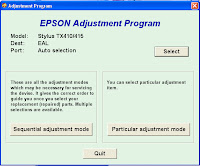
4. Open the folder resetter Epson Stylus T20 Adjprog.exe you and run the file.
5. Click Accept
6. Click Particular adjustment mode menu entry to reset the printer counter
7. Find and click on Waste ink pad counter menu, then click OK
8. Click Check to find out the counter value at the time of blinking, and Ok to continue

Click initialization to change / reset the printer counter becomes zero, so the printer to be normal again. Then click OK to continue
9. Click Finish to end the process of resetting the counter Epson Stylus T20
10. Click Previous to return to main menu
11. Click Quit to exit the program counter reset Epson Stylus T20
12. Reset waste ink counter Epson Stylus T20 is done, turn off the printer for a while, then restart the printer, and wait until the printer calibration is completed

Jumat, 29 November 2013

Reset Counter Epson Stylus C80

There two way to Set tabulator Epson Tool C80, are : Adjust Drill and using drtool software

Exercise adjust
* Bespeak trailing both the publisher and ink buttons piece you play on the knowledge.
* When the press out LED is virtuous flashing pass both buttons and press and include the inkcleaning fix for at least 10 seconds.
* The printer present round finished and ego bill for nigh 3 transactions and then serve unremarkably.

Using DRTool

* Run DRTool software
* Set printer imitate to C80
* Emit reset covering counter

Selasa, 26 November 2013

Driver Download for Epson Stylus NX420 Driver


Driver Download for Epson Stylus NX420 Driver

Epson Stylus NX420
- File name : epson13800.exe
- File Size : 82.3 MB
- Version : v6.71 
- Release Date : 11/04/11


Compatibility and System Requirements : 

- Windows 7
- Windows 7 (x64)
- Windows Vista
- Windows Vista (x64)
- Windows XP
Epson Stylus NX420 Driver
Source direct link

Senin, 25 November 2013

Error E 91 or E91 on Epson printers


Error code E-91 means the waste ink counter is full. It had to be resetted in order to fix the problem.

For some Epson printers, the software SSC Utility can reset the counter.


Epson Artisan series Artisan 700, Artisan 725, Artisan 800, Artisan 835, Artisan 837, EP-901A


Epson B and BX series B1100, B1110, B300, B300DN, B310, B310N, B40W, B42WD, B500DN, B510, B510DN, B510N, B518DN, BX300F, BX305FW, BX310FN, BX525WD, BX600FW, BX610FW, BX620FWD, BX625FWD

Epson Stylus C series C20, C40, C41, C42, C43, C44, C45, C46, C58, C59, C63, C64, C67, C68, C70, C76, C77, C78, C79, C80, C82, C83, C86, C87, C88, C90, C92, C93, C94, C95, C97, C98, C99, C110, C120, C480, C560, C660, C670, C680, C777, C880, C888

Epson Stylus CX series CX1390, CX1500 ,CX1600, CX2800, CX2900, CX3100, CX3200, CX3300, CX3400, CX3500, CX3600, CX3650, CX3700, CX3800, CX3805, CX3810, CX3900, CX4000, CX4100, CX4200, CX4500, CX4600, CX4700, CX4800, CX4850, CX4900, CX5100, CX5400, CX5500, CX5505, CX5700, CX5900, CX6300, CX6400, CX6500, CX6600, CX6900, CX6900F, CX7300, CX7400, CX7450, CX8300, CX8400, CX8450, CX9300F, CX9400F, CX9500F

 Epson Stylus D series D68, D82, D88, D92, D120

Epson Stylus DX series DX3800, DX3850, DX4000, DX4050, DX4200, DX4250, DX4400, DX4450, DX4800, DX4850, DX5000, DX5050, DX6000, DX6050, DX7300, DX7400, DX7450, DX8400, DX8450

Epson Stylus EP series EP-801A, EP-803A, EP-901A, EP903A

Epson Stylus K and L series K100, K200, K300, L100, L200, L300 Epson ME Office Series ME2, ME20, ME30, ME32, ME-B40W, ME70, ME80W, ME82WD, ME200, ME300, ME320, ME340, ME360, ME510, ME520, ME530, ME535, ME560, ME570, ME600F, ME620F, ME650N, ME650N, ME900WD, ME960FWD, ME1100

 Epson NX Series (See TX Series) NX100, NX110, NX111, NX125, NX127, NX200, NX205, NX210, NX215, NX220, NX300, NX305, NX310, NX315, NX400, NX405, NX410, NX415, NX420, NX430, NX510, NX515, NX620

 Epson PictureMate (PM) Series PM100, PM210, PM215, PM225, PM235, PM240, PM250, PM260, PM270, PM280, PM290, PM310, PM500, PM-A820, PM-A890, PM930C, PM-A950, PM-A970, PM970C, PM-G800, PM-G820, PM-D800, PM-3500C, PM,G4500, PM-G5000

Epson PX series PX600W, PX600FW, PX640, PX650, PX659, PX660, PX700W, PX700W, PX720WD, PX800FW, PX800FWD

Epson R series R200, R210, R220, R230, R240, R245, R250, R260, R265, R270, R275, R280, R285, R290, R295, R300, R310, R340, R350, R360, R365, R380, R390, R395, R520, R800, R1380, R1390, R1400, R1800, R1900, R2400, R2800, R3880, R4880, R7880

Epson RX series RX420, RX425, RX430, RX500, RX510, RX520, RX530, RX560, RX565, RX580, RX585, RX590, RX595, RX600, RX610, RX615, RX620, RX625, RX630, RX640, RX650, RX680, RX685, RX690, RX700 297

Epson S series S20, S21, S22

Epson Stylus Photo series: P50, P60, 870, 890, 1270, 1290, 1390, 1400, 1410, 1420, 2000P, 2100, R7880

Epson Stylus Pro Stylus Pro 7000, Stylus Pro 9000, Stylus Pro 9600

Epson Stylus SX series SX100, SX105, SX106, SX110, SX111, SX115, SX117, SX125, SX130, SX200, SX205, SX210, SX215, SX218, SX230, SX235, SX400, SX405, SX410, SX415, SX420W, SX425W, SX430W, SX435W, SX510W, SX515W, SX525WD, SX550W, SX600FW, SX610FW SX620FW

Epson T Series T10, T11, T13, T20, T20E, T21, T22, T23, T24, T25, T26, T27, T30, T31, T33, T40W, T42W, T42WD, T50, T59, T60, T80W, T1100, T1110

Epson TX series TX100, TX101, TX102, TX103, TX105, TX106, TX109, TX110, TX111, TX115, TX116, TX117, TX119, TX120, TX121, TX125, TX135, TX200, TX205, TX209, TX210, TX219, TX220, TX230, TX235, TX300F, TX320F, TX400, TX405, TX408, TX409, TX410, TX415, TX419, TX420, TX420W, TX510FN, TX550W, TX560WD, TX600F, TX600FW, TX600W, TX610FW, TX620FWD, TX640, TX650, TX659, TX660, TX700W, TX700FW, TX720WD, TX800W, TX800FW, TX820FWD

Epson WorkForce series 30, 40, 42, 60, 310, 315, 323, 500, 600, 610, 615, 620, 625, 630, 635, 1100, WF-7011, WF-7015, WF-7511 WF-7515, Pro-WP-4511, Pro-WP-4521, Pro-WP-4530, Pro-WP-4540

Epson: L100, L200, P50, P60, T50, T60, Pro 7000, Pro 9000, Pro 9600

Minggu, 24 November 2013

How to reset the protection counter of Epson Stylus TX410 and TX415 Resetter

 Epson Stylus TX410 and TX415 Adjustment Program

FIX PRINTER ERROR "parts inside printer end service life, waste ink pad counter overflow error"

Please follow the steps below to reset the protection counter effectively.
  1. Double click AdjProg.exe.
  2. Click “Accept” button.
  3. Click "Select" button. and choose your printer model then click "OK"
  4. Click “Particular adjustment mode” button.
  5. Select on “Waste ink pad counter” and click “OK” button.
  6. Click on “Initialization” button and the program will reset the protection counter.
  7. Turn off the printer as a program instructed then turn on again.
  8. Click “Finish” button. and its done!
Download Here!

Jumat, 22 November 2013

How to Print Test Page Pattern Canon Epson and HP Printers without CPU or Computer

Here how to test page pattern for some Canon, Epson and HP printer without Computer or CPU. Prepare paper on printer before test the printers.
A. Test page pattern for Epson Printer
For C series: C41, C42, C43, C45, C58, C61, C62, C63, C65, C67, C79, C85, C86, C87, etc.
For R series: R210, R230, R270, etc.
  • Push and hold paper/resume button and then push power button.
For CX Series like CX3500, CX3600, CX3700, CX 5100, CX4900, CX5900, etc
  • Push and hold power button, and then push ink button until indicator lamp blink once, and then release both of them.
B. Test page pattern for HP Printer
3600 series and 3700 series
  • Turn on printer, Wait until power indicator lamp stop blinking, then push and hold power button and then open and close again cover panel 3 or 4 times repeatedly.
HP37XX, HP39XX , D23XX , D24XX
  • Turn on printer , wait until power indicator lamp stop blinking then press power switch while opening the cover 5 times repeatedly then release switch button
Three in one Models
  • Switch on printer then press “cancel” and “color” at the same time
C. Test page pattern for Canon Printer
BJC 1000, BJC 2000, BJC 2100 SP, S100, S200
  • Push twice on resume button
IP 1200, IP 1300, IP 1600, IP 1700, IP 2200
  • Push 5 times on resume button
Source: http://www.duraklin.com

Minggu, 17 November 2013

Tips Using Software Resetter for Epson Printer Without Change Date Setting

At some software resetter or adjustment program for epson need date setting at computer to use the software without error. sometime change date setting in computer very disturb. in fact there are some ways to use software resetter or adjustment program for epson without changing date setting in computer and without error.

Here how :

A. Using bat file or Create bat file

Create one bat file and copy this code. You can use notepad to create it. Place the bat file at the same folder with the adjustment program.

@echo off

echo %date% > currdate.txt

date 11-07-07

rd C:adjust~1 /s/q

REG DELETE HKEY_LOCAL_MACHINESOFTWAREEPSONPTSG /f

start/wait AdjProg.exe

B. Using Date Cracker Software

  • Download and install Date Cracker and run the software.
  • Click Add button, enter program description (example: Resetter Epson C90)
  • Click add button the select the adjutment software then click open.
  • Type date setting for the adjustment program in the simulated run date.
  • Click run button to run the software.
Date CrackerNote : All this methods has been tested.

Rabu, 13 November 2013

Resetter Epson TX121 T13 T1100

After wait for a long time, finally resetter Epson T13, TX121 and T1100 available on internet. I found the resetter Epson T1100 on indoreset whereas resetter Epson T13 and TX121 on mediafire uploaded by OrTHoTaMiNe.
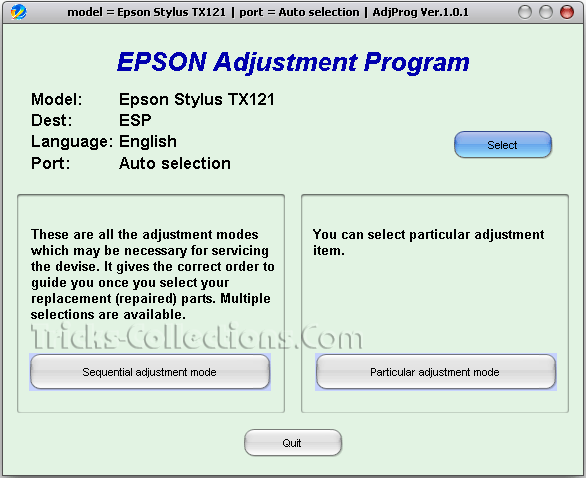
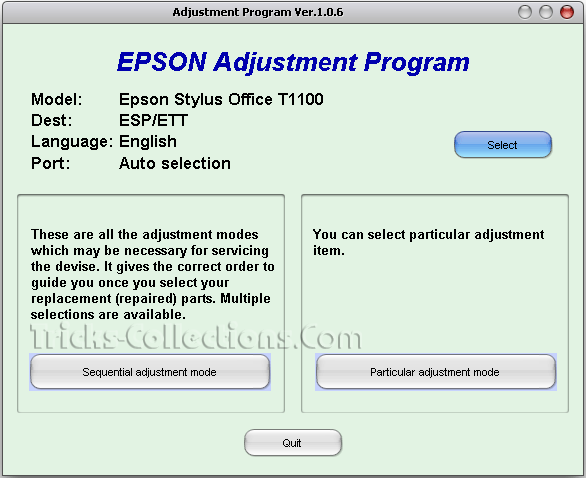
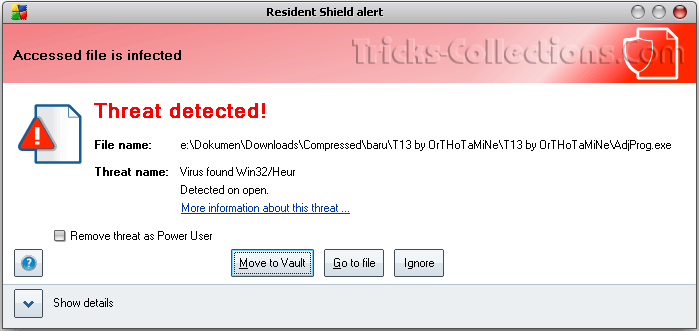
I’ve tried to run all software resetter on my computer and all software resetter not crash with antivirus installed on my computer (I use AVG) except resetter Epson T13. AVG antivirus detected Epson T23 resetter as Virus. Maybe it caused this software has cracked but I think it not problem, you can disable the antivirus protection on your computer when you want to use this software to reset your Epson printer.
Here the screenshot software resetter Epson TX121 and T1100
Epson TX121 resetter Epson T1100 Resetter
Whereas software resetter Epson T13 was detected as virus by AVG, here the screenshot:

Download link software reseter Epson T13, TX121 and T1100:
Download Resetter Epson T13
Download Resetter Epson TX121 also work on Epson ME320
Download Resetter Epson T1100

Selasa, 12 November 2013

Adjustment Program Epson PM250 PM270 PM215 PM210 and PM G800 by OrTHoTaMiNe

OrTHoTaMiNe uploaded again adjustment program for Epson PIcture Mate (PM) Series that is adjustment program for  Epson Picture Mate PM210, PM215, Epson PM250, PM270 and PM-G800.  But I don’t know all of software resetter work fine or not because I don’t have these Epson printer PM serias to try this adjustment program.
If you are interested to try all the resetter or adjustment program on need software resetter to reset or repair the counter on your Epson Picture Mate. You can download the software from download link below:
  • Download Adjustment Program Epson PM270/ Epson Picture Mate 270
  • Download Adjustment Program Epson PM250/ Epson Picture Mate 250
  • Download Adjustment Program Epson PM215/ Epson Picture Mate 215
  • Download Adjustment Program Epson PM210/ Epson Picture Mate 210
  • Download Adjustment Program Epson PM-G800/ Epson Picture Mate D800
Note: There are no guarantees any damage caused by this software on your printer. Use this software as your own risk

Minggu, 10 November 2013

Know How to Reset Epson Stylus T11 printer adjprog


Know How to Reset Epson Stylus T11 printer.adjprog
FIX PRINTER ERROR "parts inside printer end service life, waste ink pad counter overflow error"
Follow the below steps to Reset Epson Stylus T11 printer :
Step1-Connect the printer to the computer and you must have already installed the printer driver at your computer.


Step2-Download Epson Stylus T11 printer reset software here 
http://www.ziddu.com/download/7560800/ReseterT11Working-16-Nov-2009.rar.html (size 541.82 KB)

Step3-Run the adjustment program Epson T11 with a double click on "Loader.exe", 
Dont run "AdjProg.exe" because the program will not run if straight from the "AdjProg.exe"

Step4-Accept 

Step5-Select the printer model(T11 or T10),Let the port be Auto Selection.

Step6-Then select to particular adjustment mode tab.

Step7-Next you will see a list written ----Adjustment----,----Maintenance----,---Appendix----,
In Maintanence list select Waste ink pad counter.
After that you will see two box(Main pad counter and Platen Pad)

"Check the used to counter check the maximum 7800 points, you can see it in the main pad counter. 
If more or close to 7800 points that means the printer needs to be reset"
Initialization: used to reset or re-counter zerro the printer"

Select both check box and then select initialization tab below right side.
Then click Finish. Thats done...
Enjoy...

Selasa, 15 Oktober 2013

Software Resetter Epson Stylus Photo R360


Many readers asking about the adjustment program or software resetter
for Epson R360 in this blog. Actually OrTHoTaMiNe  have uploaded the
Epson resetter in his Mediafire account but still many people do not
know about it. Now I want to share download link the adjustment program
R360 info on this blog but I do not know this program work or not in
Epson R360 because I have not tested the program at the Epson printer
version.


Short Review about Epson Stylus Photo R360


The
Epson R360 is a Photo printer with CDR/DVD Printing functionality. This
printer can print directly onto CD/DVD using the special tray provided.


Epson R360


The

R360 uses 6 cartridges with high durability ink which is designed not
to fade and readily copes with all sizes and types of paper. This
printer also equipped with 3.5 inch LCD screen and memory card slots to
print without computer.

Screen-Shot Adjustment Program or Software Resetter Epson R360


Adjustment Program R360


No
warranty all problem caused by this software. Use this software as your
own risk because I have not tested this software. Download adjustment
program Epson R360 

Sabtu, 12 Oktober 2013

Download epson resetter stylus Photo C59

Download epson resetter stylus Photo C59
please copy this link and paste in your browser

http://rapidshare.com/files/97456691/stylus_C59.zip

happy download.

Rabu, 09 Oktober 2013

resetter for reset tipe epson stylus 880

resetter for reset tipe epson stylus 880 To reset diapers meter ink, leaving in the sump, use the following sequence and combination of pressing and holding the buttons on the control panel:
  1. Turn off the printer.
  2. It is necessary to replace a rug.
  3. Pressing and holding the button LOAD / EJECT and CLEANING, click POWER - will begin to flash indicators INK OUT, PAPER OUT.
  4. Drop all the buttons.
  5. Over 2 seconds press and hold 10-12 seconds, click CLEANING, is not yet mignut all indicators.
  6. Turn off the printer.

Rabu, 02 Oktober 2013

Service Manual Epson Stylus Color Printer

This manual describes functions, theory of electrical and mechanical
operations, maintenance, and repair of Epson Stylus Color. The
instructions and procedures included herein are intended for the
experience repair technician, and attention should be given to the
precautions on the preceding page. The chapters are organized as
follows: Chapter 1 Product Description, Provides a general product
overview, lists specifications, and illustrates the main components of
the printer. Chapter 2 Operating Principles, Describes the theory of
printer operations, Chapter 3 Disassembly and assembly - Includes a steb
by step guide for product disassembly and assembly, Chapter 4
Adjustments - Includes step by step guide for adjustment. Chapter 5
Troubleshooting - Provide epson-approved techniques for adjustment.
Chapter 6 Maintenance - Describe preventive maintenance techniques and
lists of lubricants and adhesives required to service the equipment.
Appendix: Describes connector pin assignments, circuit diagrams, circuit
board component layout and exploded views/diagram.


Download Link:

http://www.freeprintermanuals.com/PM/Epson%20Stylus%20Color%20Service%20Manual.pdf

Senin, 23 September 2013

Resetter Printer Epson Stylus T20 T20E Blinking

Heres my share Printer Software Epson Resetter T20 and T20E or Epson Printer Adjustment Program T20 and T20E. The trick is similar to Epson Printer How to Reset the others. The setting is there a way to include such software, you can simply download and read it. Actually this is a Software Resetter Software Trial but after going through the modification process could eventually be used without the PC Settings.


Resetter Printer Epson T20E

Kamis, 19 September 2013

Epson R200 R210 R300 R310 Waste Ink Counter Pad Reset

Here is how to reset the waste counter for the Epson R200, R210, R300 and R310 printers.
  • Press and hold “Stop”, “Maintenance”, and “Power” buttons for about 10 seconds. A message will come on the screen saying counter is reset and to turn the printer off. The R200 and others don’t have a screen so just wait until the 10 seconds is up.
  • Turn the printer off, unplug the power cord. Wait about 1 minute and power the printer back up. The counter will be reset. That’s all there is to the reset procedure.

Is the waste pad full ?

If the waste pad is actually full and ink is about to overflow, then you need to install a waste container. You can see the waste pad by opening the access panel on the back of the printer.

Changing the waste pad requires almost complete disassembly of the printer, it is a big job. There is an easier way.

Open the access panel on the rear of the printer (remove screw) and look inside carefullly with a flashlight. You will see a tube (down and to your left) coming from the cleaning pump and it will have an open end on it. This is the tube that delivers ink to the waste pad.

Use a piece of coathanger wire or equivalent, and fish out this piece of tube. Bring it to the outside of the printer, thru the access panel.

Find yourself a suitable container (Tupperware or a plastic cup or jar) that is not too tall. Put the tube into this container and secure the tube and container so they won’t come apart or lose connection if the printer is moved.

If you wish you can make a hole or notch in the access panel cover so it can be replaced.

Now the ink will go into this container and not into the waste pad inside the printer. If it gets full, dump it.

Note: This information and a couple of photos are also available on Steve’s Digicam Forum (http://stevesforums.com/forums). Goto Printers-Photo Inkjet-Epson R200-210 & R300-310 Mod

Download Software Resetter for Epson R300-310

Sabtu, 10 Agustus 2013

EPSON Stylus Photo 750 Counter Reset

This program can be used with following conditions:

  1. Download this program
  2. Change the date on your PC to February 1 2007.
  3. Run the program. It will give Expired Program message.
  4. Exit program.
  5. Delete the folder - C:/Adjustment Programs/ on your PC.
  6. Run the program. It has to work perfectly this time!
ATTENTION!
After Feb 22, 2007 the program has been expired,
but you can RUN it using instructions at the UP of the page

Jumat, 09 Agustus 2013

Epson Stylus Photo RX620

You can make the most of photos with the Epson Stylus Photo RX620. With the Epson Stylus Photo RX620 you don’t have to fuss with computers as it is all available without their use. It’s as simple as inserting a memory card or connecting your camera directly or even an external driver and then you can see all the photos on the preview screen of this convenient all in one printer.

The RX620 works fantastically for photographers, but it is not that well suited to a busy office environment. The RX620 uses lights that are inbuilt into the lid to scan negatives and even slides. For ease of use, the film adapter can be folded behind the reflective mat in the lid when not being used and the lid comes off without a problem for scanning large books.

Maintaining the RX620 is pretty simple and straightforward. You can lift the top half of the RX620 up wide on its hinges. It contains six different cartridges and each ink color can be changed one by one as they are used up unlike most other all in one printers, such as the HP Photo smart 7210, that force you to spring for a new multi-color cartridge when just one color runs out.

The Epson Stylus Photo RX620s gives emphasis to working without a computer, so you can put a digital photo memory card into the machine and use the control panel LCD to crop and resize the images, and even adjust the brightness or the contrast on the pictures before printing them. A slide can also be inserted into the transparency adapter so that it can clean up the scratches without consulting your computer. By using the LCD menu on the top of the printer you can also plug a USB CD burner directly into the front of the printer to burn photos from your memory card straight to a CD.

Epson provides plenty of software for operating the RX620 from a computer. The RX620s software centers around Epsons Smart Panel; it’s an optimistic window with buttons that open the application appropriate to your task. The maximum printing speed of this printer is 17pmm (page per minute) (mono) and 16pmm (color). Epson RX620 has 6 individual ink tanks. It comes in silver and dark grey colors and it weighs in at 19.2lbs.

In conclusion it speeds through your everyday printing and copying of your documents, saving you time to do what really matters. With all these great features available, the Epson Stylus Photo RX620 is sure to make a lasting impression. Epson RX620 is not only a perfect printer for home usage, but can be a photographer’s best friend as well.

Senin, 18 Maret 2013

Resetting Epson Chip Printers for free

Resetting Epson Chip Printers for free.
Yes, there is software out there that will allow you to reset your Epson Chip printers.

Before we go and give you the link we first want you to understand a few things:

1. This software is a very poweful piece of software and should not be used without first reading the accompanied instructions.

2. We have no stake in this software and there is no finacial benefit for our recommending it. We do recommend it because it is out there and works . We are in the ink business, not the chip reset business. Any way we can make it easier for you to refill benefits us greatly

3. Due to some recent architecure changes in chip design some printers can not have their chip reset with the softwa, but the software will allow you to store the values of a full status. If this alternative does not fufill your needs we do have available chip resetters by request.

SSC Service Utility