Tampilkan postingan dengan label iP1880. Tampilkan semua postingan

Rabu, 27 November 2013

Reset Ink Level on Canon Pixma iP1800 Canon Pixma iP1880 using iPtool software

I get this tutorial from fixyourownprinter.com forum to solve the ink level error in canon Pixma iP1800/Canon Pixma iP1880.  This problem usually appear after refilled the cartridge on the canon printer and ink level indicator showing the ink cartridge is empty although you have filled a cc Ink into the cartridge. And if the problem occur you cannot using your printer to print. The solution you must reset ink level on the printer if you want your computer work again.
If you have a problem like that you ca follow this tutorial to solve your printer  problem, here how:
  1. Turn of the printer and Disconnect the power cable to the printer.
  2. Press power button on the printer. While pressing the button connect the power cable to the power source (the power indicator will light in green)
  3. While still holding power button press resume button twice – orange blink and return to green.
  4. Release the power button, then the PC will recognize new cartridge installed (If the power indicator on the printer steady in green you continue to Steps 5)
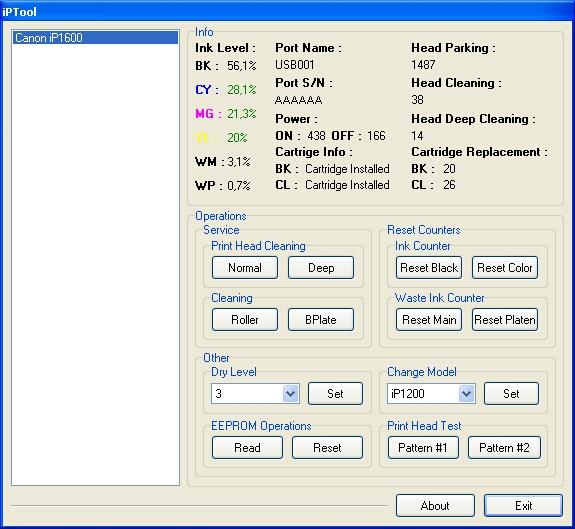
  5. Run the IPtools software, please await after this software detect your printer correctly or you can set the printer model on “Change Model” section.
    IPTool for Canon Printer
  6. Click “reset black and reset color” button to reset the ink level and Click “reset main and reset platen” to reset waste ink counter. After clicked the button you will see ink level of the cartridge on in the IPTol info has 100% and WP and WM has  set to 0. Click Exit on IPTool
  7. Turn off the printer and turn on again.
On the reset procedure above usually the problem found on steps 1-4 to make the printer steady light in green. On my experiment if steps 1-4 does not work  on your printer, you can use manual reset method for canon iP1700 before continue to steps 5.

Senin, 10 September 2012

How to Reset Waste Ink Counter Printer Canon Pixma iP 1880

There are some ways to reset waste ink counter in the Canon Pixma iP 1880. Waste Ink counter have full at Canon Pixma iP 1880 marked with The POWER and ALARM lamps flash alternately. If waste Ink have full the printer cannot be used. So, the printer will be able to be used again after reset. You are can use software resetter like GeneralTool or iPTool to reset Canon Pixma iP 1880, you can also do reset manual. Following its way to reset Canon Pixma iP 1880 :

A. Reset Manual.

On reset manual, sometime printer return blinking after turn on again. For reset manual following its way :

* Turn the printer on
* Press and hold Resume button for 1-2 minutes
* Open the printer cover
* Release the catridge and then put catridge again
* Close The Cover
* Turn Off then Turn On again.


B. Using GeneralTool for canon pixma ip 1800 series

Before using GeneralTool for canon pixma ip 1800, printer driver should have been install correcly in the computer.

Using GeneralTool iP 1800...? why do not use GeneralTool iP 1880. Canon Pixma iP 1880 is canon iP 1800 series. Follow this intruction to reset the printer :

* Download software resetter for canon pixma iP1880 from Here :
http://www.mediafire.com/?nmfns4hixel

* Before connecting printer to the power suply, press and hold power button then connecting the printer to the power.
* While hold the power button press reject button for 2 times then release power button.
* Run general tool for canon iP 1880. After the printer know, Click lock release button. ( note : to view locK release menu, min resolution 1024 x 728).
* Then select Set Destination to iP1800 (my canon iP 1880 printer is iP1800ASA)
* Click MAIN and PLATEN button to reset waste ink counter to zero.
* Finally test print by click TEST PATTERN button.


C. Using iPTool software

This is software from Rusia for canon iP series. Using this software give separate experience. this software detect automatically attached printer in the computer. following way reset to use iPTool software :

* Download and ektrak iPtool software, you can download the software from this url : RCore Tools Page - iPTool, MPTool
* Turn on the printer
* Then run iptool software, the software will detect the printer automatically.
* To reset waste ink counter to zero click “Reset Main” and “Reset Platen” button.
* To view the result do test print.