Tampilkan postingan dengan label of. Tampilkan semua postingan

Minggu, 24 November 2013

How to reset the protection counter of Epson Stylus TX410 and TX415 Resetter

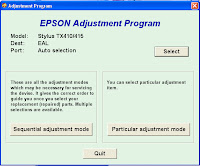
 Epson Stylus TX410 and TX415 Adjustment Program

FIX PRINTER ERROR "parts inside printer end service life, waste ink pad counter overflow error"

Please follow the steps below to reset the protection counter effectively.
  1. Double click AdjProg.exe.
  2. Click “Accept” button.
  3. Click "Select" button. and choose your printer model then click "OK"
  4. Click “Particular adjustment mode” button.
  5. Select on “Waste ink pad counter” and click “OK” button.
  6. Click on “Initialization” button and the program will reset the protection counter.
  7. Turn off the printer as a program instructed then turn on again.
  8. Click “Finish” button. and its done!
Download Here!

Selasa, 06 Agustus 2013

Benefits of the XPS Printer Driver

Benefits of the XPS Driver:

Improved color printing

High-fidelity print output

Faster printing of documents with rich graphics

Improved color printing

The operating system can communicate a broader range of color information from applications to inkjet printers that use more than four ink colors (known as wide-gamut printers).

The advanced color capabilities available in XPS make Windows Vista a great platform for printing photos with more lifelike output.

High-fidelity print output

The XPS print infrastructure enables high-fidelity output by reducing or eliminating image data conversions and color space conversions that typically occur during printing.

The benefit for users is that smooth shadings, fades, and glow effects used in modern documents print just as intended, without loss of image fidelity or color fidelity.

Faster printing of documents with rich graphics

With XPS-enabled enterprise class printers—available now from many printer manufacturers—the time spent waiting to finish printing a rich, color graphics document is dramatically reduced.

Consider a Microsoft PowerPoint presentation that has the same color background repeated across 30 slides.

Before XPS, that enterprise printer would render that same color image 30 times, creating a massive "spool" or print file (and a long wait for everyone else that needed the printer). These massive spool files were also a tax on network bandwidth.

With XPS, the color image is sent to and rendered by the printer once.
Rabu, 15 Mei 2013

Review of the Copystar CS 1820


Overview:

The Copystar CS-1820, a multifunctional printer, is equipped with print, scan, copy and the   capacity to fax. This printer is compact and potent meant for small offices that do not need a printer for mass printing needs.

Pros:

For a multifunctional printer the CS-1820 provides extraordinary speeds when it comes to output; for letter paper it prints at 18 ppm, and for legal paper it prints at 15 ppm. When it comes to the copy and printing speeds the same response is expected. When it comes to initial copy results it clocks in at 9.5 seconds or less. For initial print results it is even more remarkable as it clocks in at 8 seconds. When it comes to resolution the Copystar CS-1820 is exciting. It has a standard resolution of 600 x 600 dpi and 256 levels. When combined with Fast 1200 mode the resolution increases to 1800 x 600 dpi, and with KIR it reaches a resolution of 2400 x 600 dpi. These impressive resolutions are due to its customary 96MB of memory which when a 100 Pin DIMMS slot is integrated into it the memory increases to 320MB. When you perform the upgrade it allows the printer to handle the increased resolutions without issue along with other features and capabilities of the printer. To help produce jobs that need to be adapted via magnification this printer has an automatic magnification that is full size. It has the ability to zoom in 1% increments from 50% to 200%.

The Copystar CS-1820 has the ability to handle imaging for text and photo products; it accomplishes this using automated and manual exposure controls. This printer also comes equipped with an ECO function which saves on toner and power usage lowering production costs. The CS-1820 can copy uninterrupted up to 999 copies, and then can be reset automatically back to 1 copy. In addition it comes with other options for copying including; paper select, copy priority, 8 job plans, electronic sorting and a job cache.

This printer uses an implanted controller that has a PowerPC 750 processor with a whopping 300MHz, and the RAM is shared by all the various functions. Network capable it will support the following protocols; TCP/IP, AppleTalk, and NETBEUI. When scanning in color you can choose resolutions from 200 to 600 dpi in increments of 100 dpi with the exception of 500 dpi. Scan production speeds are reasonable with monochrome speeds of 18 ppm and color speeds of 5 ppm. Fax capabilities are optional to include network faxing. Fax capabilities come with a G3 modem working at a speed of 33 Kbps. When transmitting it takes about 3 seconds per page, and the quick scan ability works in less than 2.5 seconds.

Equipped with a 50 sheet multipurpose tray for media and a standard 250 sheet paper tray; the CS-1820 can come with an additional 250 sheet paper tray option. Also included is a document feeder for 50 sheets of paper that feeds automatically for up to 18 genuine papers per minute and processes paper with a weight of 13 to 32 lbs.

Cons:
With limited capabilities when it comes to volume, the condensed size of the Copystar CS-1820 may hinder it. If an office requires a multifunctional printer that can process high levels of output then it is not nearly big enough as it only measures 19.5 x 16.6 x 17.9 inches.