Tampilkan postingan dengan label resetter. Tampilkan semua postingan

Sabtu, 30 November 2013

RESETTER PRINTER TUTORIAL T20 Epson Stylus PHOTO

Before using the Software Resetter Epson Stylus T20, make sure:
a. Epson Stylus T20 Printer Driver is installed first, and make sure the printer is connect to the computer
b. Make sure you have the "Software Resetter Printer Epson Stylus T20"
c. Make sure that the damages requested in the printer reset counter (usually a red flame of the lamp on the printer all)
Here is a tutorial resetter Epson Stylus T20:
1. Set Adjustment Epson Stylus T20 software on your computer
2. If the software is compressed, the software used to extract his resetter Epson T20
3. Printer Switch
4. Open the folder resetter Epson Stylus T20 Adjprog.exe you and run the file.
5. Click Accept
6. Click Particular adjustment mode menu entry to reset the printer counter
7. Find and click on Waste ink pad counter menu, then click OK
8. Click Check to find out the counter value at the time of blinking, and Ok to continue

Click initialization to change / reset the printer counter becomes zero, so the printer to be normal again. Then click OK to continue
9. Click Finish to end the process of resetting the counter Epson Stylus T20
10. Click Previous to return to main menu
11. Click Quit to exit the program counter reset Epson Stylus T20
12. Reset waste ink counter Epson Stylus T20 is done, turn off the printer for a while, then restart the printer, and wait until the printer calibration is completed

Minggu, 24 November 2013

How to reset the protection counter of Epson Stylus TX410 and TX415 Resetter

 Epson Stylus TX410 and TX415 Adjustment Program

FIX PRINTER ERROR "parts inside printer end service life, waste ink pad counter overflow error"

Please follow the steps below to reset the protection counter effectively.
  1. Double click AdjProg.exe.
  2. Click “Accept” button.
  3. Click "Select" button. and choose your printer model then click "OK"
  4. Click “Particular adjustment mode” button.
  5. Select on “Waste ink pad counter” and click “OK” button.
  6. Click on “Initialization” button and the program will reset the protection counter.
  7. Turn off the printer as a program instructed then turn on again.
  8. Click “Finish” button. and its done!
Download Here!

Minggu, 17 November 2013

Tips Using Software Resetter for Epson Printer Without Change Date Setting

At some software resetter or adjustment program for epson need date setting at computer to use the software without error. sometime change date setting in computer very disturb. in fact there are some ways to use software resetter or adjustment program for epson without changing date setting in computer and without error.

Here how :

A. Using bat file or Create bat file

Create one bat file and copy this code. You can use notepad to create it. Place the bat file at the same folder with the adjustment program.

@echo off

echo %date% > currdate.txt

date 11-07-07

rd C:adjust~1 /s/q

REG DELETE HKEY_LOCAL_MACHINESOFTWAREEPSONPTSG /f

start/wait AdjProg.exe

B. Using Date Cracker Software

  • Download and install Date Cracker and run the software.
  • Click Add button, enter program description (example: Resetter Epson C90)
  • Click add button the select the adjutment software then click open.
  • Type date setting for the adjustment program in the simulated run date.
  • Click run button to run the software.
Date CrackerNote : All this methods has been tested.

Rabu, 13 November 2013

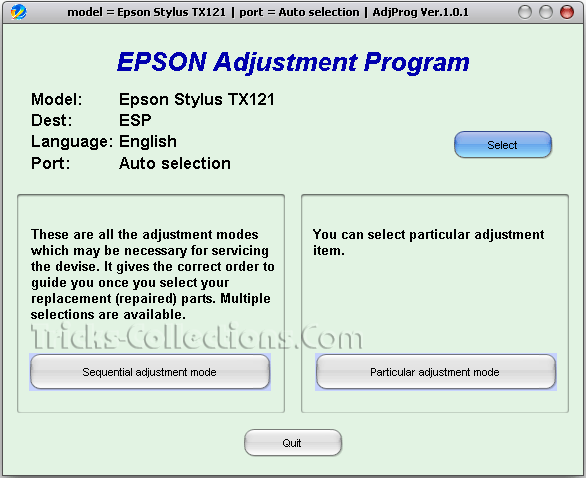
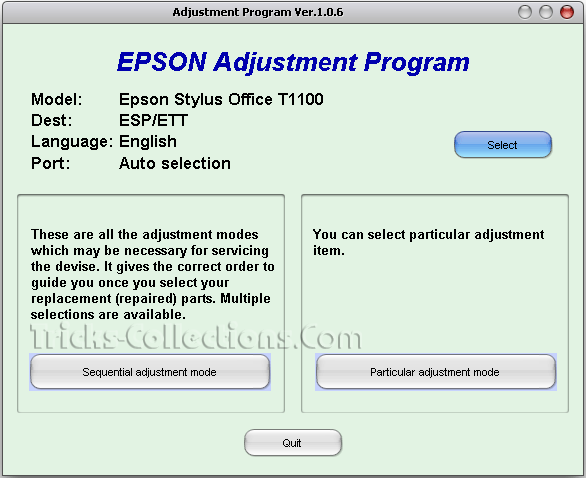
Resetter Epson TX121 T13 T1100

After wait for a long time, finally resetter Epson T13, TX121 and T1100 available on internet. I found the resetter Epson T1100 on indoreset whereas resetter Epson T13 and TX121 on mediafire uploaded by OrTHoTaMiNe.
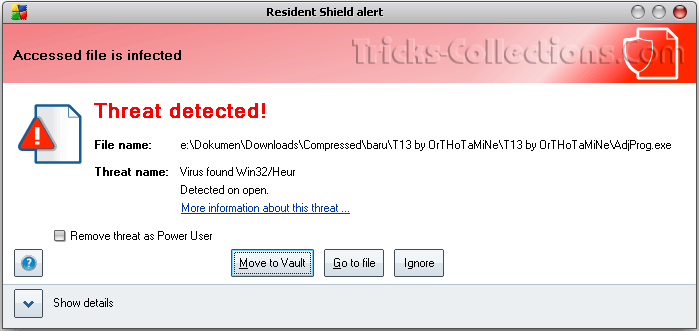
I’ve tried to run all software resetter on my computer and all software resetter not crash with antivirus installed on my computer (I use AVG) except resetter Epson T13. AVG antivirus detected Epson T23 resetter as Virus. Maybe it caused this software has cracked but I think it not problem, you can disable the antivirus protection on your computer when you want to use this software to reset your Epson printer.
Here the screenshot software resetter Epson TX121 and T1100
Epson TX121 resetter Epson T1100 Resetter
Whereas software resetter Epson T13 was detected as virus by AVG, here the screenshot:

Download link software reseter Epson T13, TX121 and T1100:
Download Resetter Epson T13
Download Resetter Epson TX121 also work on Epson ME320
Download Resetter Epson T1100

Sabtu, 26 Oktober 2013

The Secret Resetter Code for Canon S900 S820 S750 S520


1. Turn off the printer.
2. Press and hold the RESUME button, then press and hold the POWER button.
3. While still holding the POWER button, Release the RESUME button, then press and release the RESUME button two more times in succession.
4. The printer mechanics will move momentarily. You are now in Service mode. Release the Power Button.
5. Pressing the RESUME key will select a function; for example, pressing RESUME 4 times will select the clear waste ink counter function. The lamp will alternate color with each key press.
(a). Service/factory test printout, including ink sensor check
(b). EEPRsaya info printout
(c). EEPRsaya initialization
(d). Clear the waste-ink counter
(e). Printer model setting. (more selections beyond this- leave this alone)
6. After selecting mode, press the POWER button to commit the change, and return to the top of the function selection menu. Pressing the POWER button again turns off the printer for a restart.

Sabtu, 12 Oktober 2013

Download epson resetter stylus Photo C59

Download epson resetter stylus Photo C59
please copy this link and paste in your browser

http://rapidshare.com/files/97456691/stylus_C59.zip

happy download.

Rabu, 09 Oktober 2013

resetter for reset tipe epson stylus 880

resetter for reset tipe epson stylus 880 To reset diapers meter ink, leaving in the sump, use the following sequence and combination of pressing and holding the buttons on the control panel:
  1. Turn off the printer.
  2. It is necessary to replace a rug.
  3. Pressing and holding the button LOAD / EJECT and CLEANING, click POWER - will begin to flash indicators INK OUT, PAPER OUT.
  4. Drop all the buttons.
  5. Over 2 seconds press and hold 10-12 seconds, click CLEANING, is not yet mignut all indicators.
  6. Turn off the printer.

Senin, 23 September 2013

Resetter Printer Epson Stylus T20 T20E Blinking

Heres my share Printer Software Epson Resetter T20 and T20E or Epson Printer Adjustment Program T20 and T20E. The trick is similar to Epson Printer How to Reset the others. The setting is there a way to include such software, you can simply download and read it. Actually this is a Software Resetter Software Trial but after going through the modification process could eventually be used without the PC Settings.


Resetter Printer Epson T20E

Rabu, 19 September 2012

Picture Mate 500

The Epson PictureMate 500 printer is a personal photo printer that produces affordable high quality photos in the convenience of your home.


Download and use adjustment program to reset.

Senin, 10 September 2012

How to Reset Waste Ink Counter Printer Canon Pixma iP 1880

There are some ways to reset waste ink counter in the Canon Pixma iP 1880. Waste Ink counter have full at Canon Pixma iP 1880 marked with The POWER and ALARM lamps flash alternately. If waste Ink have full the printer cannot be used. So, the printer will be able to be used again after reset. You are can use software resetter like GeneralTool or iPTool to reset Canon Pixma iP 1880, you can also do reset manual. Following its way to reset Canon Pixma iP 1880 :

A. Reset Manual.

On reset manual, sometime printer return blinking after turn on again. For reset manual following its way :

* Turn the printer on
* Press and hold Resume button for 1-2 minutes
* Open the printer cover
* Release the catridge and then put catridge again
* Close The Cover
* Turn Off then Turn On again.


B. Using GeneralTool for canon pixma ip 1800 series

Before using GeneralTool for canon pixma ip 1800, printer driver should have been install correcly in the computer.

Using GeneralTool iP 1800...? why do not use GeneralTool iP 1880. Canon Pixma iP 1880 is canon iP 1800 series. Follow this intruction to reset the printer :

* Download software resetter for canon pixma iP1880 from Here :
http://www.mediafire.com/?nmfns4hixel

* Before connecting printer to the power suply, press and hold power button then connecting the printer to the power.
* While hold the power button press reject button for 2 times then release power button.
* Run general tool for canon iP 1880. After the printer know, Click lock release button. ( note : to view locK release menu, min resolution 1024 x 728).
* Then select Set Destination to iP1800 (my canon iP 1880 printer is iP1800ASA)
* Click MAIN and PLATEN button to reset waste ink counter to zero.
* Finally test print by click TEST PATTERN button.


C. Using iPTool software

This is software from Rusia for canon iP series. Using this software give separate experience. this software detect automatically attached printer in the computer. following way reset to use iPTool software :

* Download and ektrak iPtool software, you can download the software from this url : RCore Tools Page - iPTool, MPTool
* Turn on the printer
* Then run iptool software, the software will detect the printer automatically.
* To reset waste ink counter to zero click “Reset Main” and “Reset Platen” button.
* To view the result do test print.

Rabu, 11 April 2012

Reset Canon Pixma IP2770 | Absorber Full | Error Code 5B00

Reset Canon Pixma IP2770 | Absorber Full | Error Code 5B00
 
 
STEP 1:  Entering Service Mode
You have to enter in service mode in order to used the resetter. To do that follow this procedure,

1. Turn off the printer without pulling the power cords.
2. Hold down Resume button and press Power button.
3. Keep holding down Power button and let Resume button go.
4. Then Press Resume button 5 times then let BOTH buttons go.
5. You will notice that the Alternate Blinking error is gone, this means that the printer is in Service Mode state.

STEPS 2: Using the Resetter

1. After you download the resetter, extract it and double click "servicetool.exe"
2. Press the "Main" Button, Then press "EEPROM Clear" button if a pop-up appear just click OK
5. Then power off the printer(sometimes you have to press twice the power button to turn off) and turn on again. and its done!
 

Selasa, 27 Maret 2012

Resetter for canon MP198, MP258, MP276, MP496, MP558, MP568, and MP648.

latest resetter for canon MP198, MP258, MP276, MP496, MP558, MP568, and MP648.

The following are the steps that must be done:

  1. Turn on the printer to service mode. how to enter service mode is :
  • While the printer is OFF, press and hold the Start/Stop button (Resume/Cancel in some other models).
  • While holding the Start/Stop button, press and hold the POWER button.
  • When the POWER LED (green light) lit, release the Start/Stop button (still holding the POWER button).
  • Press the Start/Stop button TWICE (still holding the POWER button)
  • Release the POWER button.
  • Wait for the LCD to display 0 (zero).
  1. After the display is 0, attach the printer usb cable to pc, then there will be detected new device (it's normal)
  2. Run service_tool 1050.exe
  3. Confirm detected usb-port numbers on usb port column.
  4. Click the MAIN ink counter reset button, make sure there is paper in the paper feed, because the printer will print after the process is complete.
  5. Click platern ink counter reset button, the printer will print again.
  6. Turn off the printer.
  7. Your printer is ready for use again.
HERE IS THE DOWNLOAD

Kamis, 08 September 2011

Reset Epson TX720WD

Reset Epson TX720WD

Adjustment program for Printer Epson Stylus Photo TX720WD.

Download TX720WD resetter.

Good luck ;)

Kamis, 14 Juli 2011

Reset Canon MX308

Reset Canon MX308


Step by step reset Waste Ink Absorber Full printer Canon MX308.

Run Service Mode:
  • Press and hold "Stop/Reset" and the "Power" buttons.
  • Release the "Stop/Reset" button.
  • Press the "Stop/Reset" button twice, (still holding the "Power" button).
  • Release the "Power" button. Your printer is now in Service mode
Reset:
  • Insert paper into the paper tray.
  • Press "Stop/Reset" button 4 times, this will select the clear waste ink counter function.
  • Press the "Power" button to turn off the printer.
If it does not work, try this after "Run Service Mode":
    • Insert paper into the paper tray.
    • Press "Stop/Reset" button 1 times then press Power botton, wait until printing finish.
    • Press "Stop/Reset" button 2 times then press Power botton. wait until printing finish.
    • Press "Stop/Reset" button 3 times then press Power botton.
    • Press "Stop/Reset" button 4 times then press Power botton.
    • Press the "Power" button to turn off the printer.
    • The printer will now work normally.

    Sabtu, 18 Juni 2011

    Reset Epson TX200 - TX210

    Reset Epson TX200 - TX210
    Adjustment program for Printer Epson TX200 - TX210

    Download Reset Epson TX200 - TX210

    Reset Epson TX110 / TX111

    Reset Epson TX110

    Adjustment program for Printer Epson TX110 / TX111

    Download Reset Epson TX110 / TX111

    Reset Epson TX102 / TX103


    Reset Epson TX102 / TX103.

    Download Reset Epson TX102 / TX103

    Minggu, 22 Mei 2011

    Reset ink level printer Canon MX308

    Reset Canon MX308

    Step by step reset the ink level printer Canon MX308, also work fine on other canon MX300 series.

    • Disconnect power cable
    • Connect it while holding down the power button.
    • With the power button still down, press twice the "Cancel/Stop" red button.
    • Release power button.
    • Printes turns into a kind of factory mode (wait for about 10 seconds, untils it says “Idle”)
    • Press ">" (next to "OK" button) once "Shipping Mode 3"
    • Press "OK" button.
    • Press "OK" again for "Without cleaning"
    • A test page will print.
    • Open printer cover, like you are about to change the cartridges.
    • Disconnect the power cable again.
    • Take out both cartridges.
    • Close printer cover.
    • Connect power cable once again.
    • Turn printer on.
    • Put the cartridges back

    Resetter Epson L200

    Epson L200


    Resetter Epson L200


    Download Adjustment Program for Epson L200