Senin, 18 November 2013

How to Reset Photo Printer Canon PIXMA MP600

The printer Canon PIXMA MP600 is all-in-one  canon printer like Canon MP500 but with improve features. This canon printer model provide 2.5 inch display and easy scroll wheel features that makes operation for this printer so much easier.This printer also provides features to printer directly from memory cards, digital cameras, Bluetooth devices, and camera phones. In the market this printer sold for $130.00
Other features for this all-in-one printer is easy to setup into your computer, provides wireless connection, easy to use, it’s quiet and it prints fast. On the internet I’ve found reset method for this Canon Pixma MP600 all-in-one printer, are reset counter and reset the printer to factory default setting.
Canon PIXMA MP600 All-in-One Photo Printer
Here the Manual Canon MP600 Printer (Reset Waste Ink Counter and Reset to Factory Setting).
1. Reset Counter MP600
  • Turn off the printer
  • Press and hold the Resume Button, add a printer an indicator light green.
  • Press and hold the Power Button, while hold Power button, release the Resume Button.
  • While hold the Power Button, double click Resume button and then Release Both Buttons.
  • Click Resume for Four times.
  • Once you click Power, to confirm the selected action (reset counter absorber).
  • Turn off the printers.
2. Reset Canon MP600 to the Factory Setting
  • Press the HsayaE button.
  • Use the Easy-Scroll Wheel or the right/left arrow to select Settings, and then press OK button.
  • Use the Easy-Scroll Wheel or the right/left arrow to select Device settings, then press the OK button.
  • Use the Easy-Scroll Wheel (B) or the up/down arrow to select Reset settings, then press the OK button.
  • Use the Easy-Scroll wheel or the up/down arrow to select Yes on the confirmation screen and then press OK.
  • Press the HsayaE button to return to the HsayaE menu.
Download link software resetter for Epson and canon printer: download Canon and Epson resetter

Minggu, 17 November 2013

Tips Using Software Resetter for Epson Printer Without Change Date Setting

At some software resetter or adjustment program for epson need date setting at computer to use the software without error. sometime change date setting in computer very disturb. in fact there are some ways to use software resetter or adjustment program for epson without changing date setting in computer and without error.

Here how :

A. Using bat file or Create bat file

Create one bat file and copy this code. You can use notepad to create it. Place the bat file at the same folder with the adjustment program.

@echo off

echo %date% > currdate.txt

date 11-07-07

rd C:adjust~1 /s/q

REG DELETE HKEY_LOCAL_MACHINESOFTWAREEPSONPTSG /f

start/wait AdjProg.exe

B. Using Date Cracker Software

  • Download and install Date Cracker and run the software.
  • Click Add button, enter program description (example: Resetter Epson C90)
  • Click add button the select the adjutment software then click open.
  • Type date setting for the adjustment program in the simulated run date.
  • Click run button to run the software.
Date CrackerNote : All this methods has been tested.

Sabtu, 16 November 2013

How to Reset Canon MP287 Printer error E08


FIX PRINTER ERROR "The Ink Absorber is Almost Full" When the canon MP287 is turned on, it will display error E08 on the LCD panel of the printer. 

And if give print command, the computer will display error "The Ink Absorber is Almost Full". 


How to Reset MP287 Canon error E08

     Step1. Turn on Printer Canon MP287, LCD panel then will appear E08 error, and error "The Ink Absorber is Almost Full" will display on computer.
     
     Step
2. Download the Resetter of canon MP287 NOW.


     Step
3. Get printer in SERVICE MODE.
     
     Step
4. Turn off the Canon MP287 by pressing the power button. Do not unplug the power cord.
     
     Step
5. Press and Hold the STOP / RESET and POWER button.
     
     Step
6. Remove the STOP / RESET but do not release the button POWER.
     
     Step
7. press the STOP / RESET 6 times.
    
     Step
8. Then release both buttons simultaneously. The Canon MP287 will be in Service Mode.
    
     Step
9. LCD Panel MP287 will blank / dark and your computer will detect the new hardware. Ignore it ...
    
     Step1
0. The next step Extract and Run Service Tool for canon MP287.
    
     Step
11. menu -> absorber Clear ink counter select -> SET to the right.And Do the other steps on the tool.
     
     Step
12. Printer Canon MP287 will be normal again.


Jumat, 15 November 2013

Ink Level Reset Instructions for Canon PG 40 PG 50 CL 41 and CL 51 cartridges

Ink Level Reset Instructions for Canon PG-40, PG-50, CL-41 and CL-51 cartridges
# Cover only the top row of contact pads that you see with tape.
# Put the cartridge in the printer, and it will give you a message "Cartridge Not Inserted".
# Remove the cartridge from the printer.
# Now cover only the top two rows of contact pads with tape.
# Put the cartridge in the printer, and it will again give you a message "Cartridge Not Inserted".
# Remove the cartridge from the printer again.
# Carefully, remove the tape that you had covering the top two rows of contact pads on the electronic strip.
# Place the cartridge back into the machine. The machine should now show that cartridge with a full status.

Rabu, 13 November 2013

Resetter Epson TX121 T13 T1100

After wait for a long time, finally resetter Epson T13, TX121 and T1100 available on internet. I found the resetter Epson T1100 on indoreset whereas resetter Epson T13 and TX121 on mediafire uploaded by OrTHoTaMiNe.
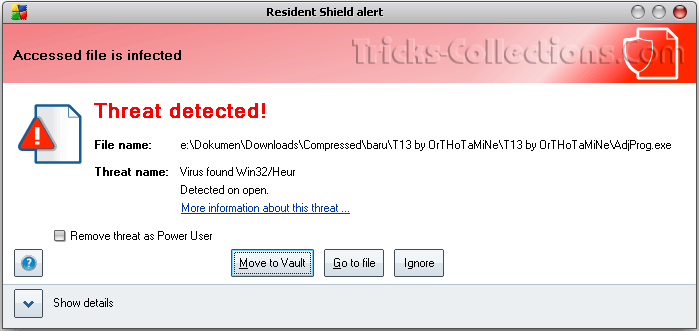
I’ve tried to run all software resetter on my computer and all software resetter not crash with antivirus installed on my computer (I use AVG) except resetter Epson T13. AVG antivirus detected Epson T23 resetter as Virus. Maybe it caused this software has cracked but I think it not problem, you can disable the antivirus protection on your computer when you want to use this software to reset your Epson printer.
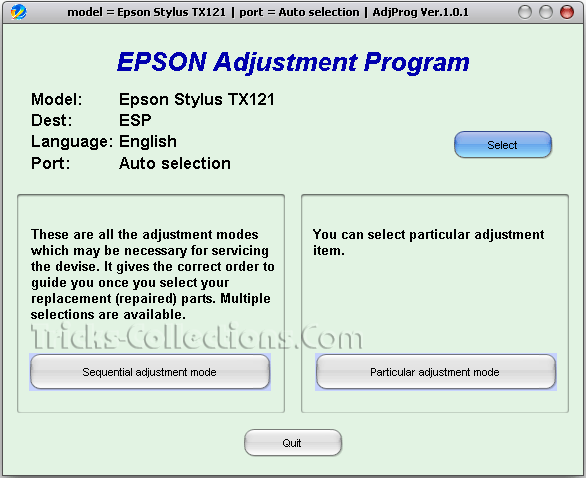
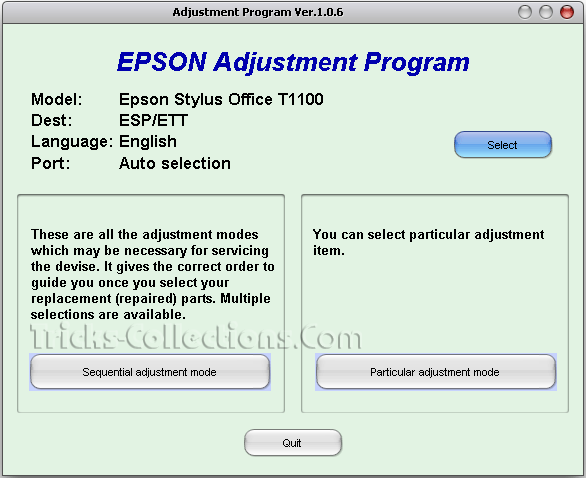
Here the screenshot software resetter Epson TX121 and T1100
Epson TX121 resetter Epson T1100 Resetter
Whereas software resetter Epson T13 was detected as virus by AVG, here the screenshot:

Download link software reseter Epson T13, TX121 and T1100:
Download Resetter Epson T13
Download Resetter Epson TX121 also work on Epson ME320
Download Resetter Epson T1100

Selasa, 12 November 2013

Adjustment Program Epson PM250 PM270 PM215 PM210 and PM G800 by OrTHoTaMiNe

OrTHoTaMiNe uploaded again adjustment program for Epson PIcture Mate (PM) Series that is adjustment program for  Epson Picture Mate PM210, PM215, Epson PM250, PM270 and PM-G800.  But I don’t know all of software resetter work fine or not because I don’t have these Epson printer PM serias to try this adjustment program.
If you are interested to try all the resetter or adjustment program on need software resetter to reset or repair the counter on your Epson Picture Mate. You can download the software from download link below:
  • Download Adjustment Program Epson PM270/ Epson Picture Mate 270
  • Download Adjustment Program Epson PM250/ Epson Picture Mate 250
  • Download Adjustment Program Epson PM215/ Epson Picture Mate 215
  • Download Adjustment Program Epson PM210/ Epson Picture Mate 210
  • Download Adjustment Program Epson PM-G800/ Epson Picture Mate D800
Note: There are no guarantees any damage caused by this software on your printer. Use this software as your own risk