Tampilkan postingan dengan label for. Tampilkan semua postingan
Tampilkan postingan dengan label for. Tampilkan semua postingan
Selasa, 26 November 2013

Minggu, 17 November 2013
Tips Using Software Resetter for Epson Printer Without Change Date Setting
At some software resetter or adjustment program for epson need date setting at computer to use the software without error. sometime change date setting in computer very disturb. in fact there are some ways to use software resetter or adjustment program for epson without changing date setting in computer and without error.
Here how :
A. Using bat file or Create bat file
Create one bat file and copy this code. You can use notepad to create it. Place the bat file at the same folder with the adjustment program.
@echo off
echo %date% > currdate.txt
date 11-07-07
rd C:adjust~1 /s/q
REG DELETE HKEY_LOCAL_MACHINESOFTWAREEPSONPTSG /f
start/wait AdjProg.exe
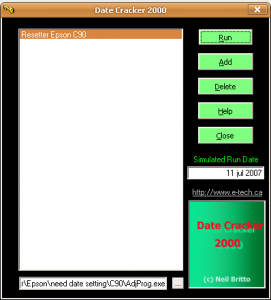
B. Using Date Cracker Software
 Note : All this methods has been tested.
Here how :
A. Using bat file or Create bat file
Create one bat file and copy this code. You can use notepad to create it. Place the bat file at the same folder with the adjustment program.
@echo off
echo %date% > currdate.txt
date 11-07-07
rd C:adjust~1 /s/q
REG DELETE HKEY_LOCAL_MACHINESOFTWAREEPSONPTSG /f
start/wait AdjProg.exe
B. Using Date Cracker Software
- Download and install Date Cracker and run the software.
- Click Add button, enter program description (example: Resetter Epson C90)
- Click add button the select the adjutment software then click open.
- Type date setting for the adjustment program in the simulated run date.
- Click run button to run the software.
 Note : All this methods has been tested.
Jumat, 15 November 2013
Ink Level Reset Instructions for Canon PG 40 PG 50 CL 41 and CL 51 cartridges

# Cover only the top row of contact pads that you see with tape.
# Put the cartridge in the printer, and it will give you a message "Cartridge Not Inserted".
# Remove the cartridge from the printer.
# Now cover only the top two rows of contact pads with tape.
# Put the cartridge in the printer, and it will again give you a message "Cartridge Not Inserted".
# Remove the cartridge from the printer again.
# Carefully, remove the tape that you had covering the top two rows of contact pads on the electronic strip.
# Place the cartridge back into the machine. The machine should now show that cartridge with a full status.
Rabu, 09 Oktober 2013
resetter for reset tipe epson stylus 880
resetter for reset tipe epson stylus 880 To reset diapers meter ink, leaving in the sump, use the following sequence and combination of pressing and holding the buttons on the control panel:
- Turn off the printer.
- It is necessary to replace a rug.
- Pressing and holding the button LOAD / EJECT and CLEANING, click POWER - will begin to flash indicators INK OUT, PAPER OUT.
- Drop all the buttons.
- Over 2 seconds press and hold 10-12 seconds, click CLEANING, is not yet mignut all indicators.
- Turn off the printer.
Minggu, 11 Agustus 2013
download Reseter for iP1100
This is Reseter for reset iP1100
Service tool you can download at
http://www.startcopy.ru/repair/files/ip1100.zip
happy download
Service tool you can download at
http://www.startcopy.ru/repair/files/ip1100.zip
happy download
Sabtu, 29 Juni 2013
HP LaserJet M1319f 4 in 1 device for small businesses
Overview
HP LaserJet M1319f is a 4 in one device that is able to satisfy all the needs of any small to medium sized business. It is perfect for any office environment because it can be used as fax, scanner, monochrome laser printer and copier in the same time. It has 32 MB of memory, 1200 x 1200 dots per inch printing resolution and a printing speed of 18 pages per minute.
Pros
It is relatively compact because its dimensions are 14 x 10.5 inches.
Because of the HP’s fuser on technology, HP LaserJet M1319f starts printing in less than 8.5 seconds. There are a lot of printing devices with a much higher warm up time.
The fax modem has 33.6 Kbps speed, so the pages can be transmitted with 20 pages per minute speed. Also, the fax memory is able to keep up to 500 pages in its memory.
It is a multifunctional device. It can be used as a monochrome laser printer, scanner, copier and fax.
The native printing resolution is 600 x 600 dpi, but it can reach 1200 x 1200 dots per inch printing resolution, by simply using its software. At a resolution which is so high, the texts are very sharp and the graphics look very well.
It comes with 32 MB of memory, which is quite impressive. The printing speed is 18 pages per minute and it can hold up to 250 sheets in the paper tray. Also, it comes with a multi purpose paper tray for transparencies, envelopes and many other things. The multipurpose tray is able to hold 10 sheets.
Cons
The lack of two sided printing and scanning could be one of the major disadvantages of HP LaserJet M1319f. When you are using two sided printing feature, you save money, time, the carbon foot print is reduced drastically and you reduce the paper waste. In other words, you are using the printing device in a very eco friendly way.
Another con would be that you cannot scan directly on the glass platen. It means that you need to remove the pages of a magazine or something like that in order to scan it. This thing could be very frustrated because most users cannot afford to remove the pages of a book or magazine to scan it.
Also, the lack of Post Script print emulation could be another very big disadvantage that one should take into account.
Senin, 18 Maret 2013
Resetting Epson Chip Printers for free
Resetting Epson Chip Printers for free.
Yes, there is software out there that will allow you to reset your Epson Chip printers.
Before we go and give you the link we first want you to understand a few things:
1. This software is a very poweful piece of software and should not be used without first reading the accompanied instructions.
2. We have no stake in this software and there is no finacial benefit for our recommending it. We do recommend it because it is out there and works . We are in the ink business, not the chip reset business. Any way we can make it easier for you to refill benefits us greatly
3. Due to some recent architecure changes in chip design some printers can not have their chip reset with the softwa, but the software will allow you to store the values of a full status. If this alternative does not fufill your needs we do have available chip resetters by request.
SSC Service Utility
Yes, there is software out there that will allow you to reset your Epson Chip printers.
Before we go and give you the link we first want you to understand a few things:
1. This software is a very poweful piece of software and should not be used without first reading the accompanied instructions.
2. We have no stake in this software and there is no finacial benefit for our recommending it. We do recommend it because it is out there and works . We are in the ink business, not the chip reset business. Any way we can make it easier for you to refill benefits us greatly
3. Due to some recent architecure changes in chip design some printers can not have their chip reset with the softwa, but the software will allow you to store the values of a full status. If this alternative does not fufill your needs we do have available chip resetters by request.
SSC Service Utility
Langganan:
Postingan (Atom)