Tampilkan postingan dengan label IP2770. Tampilkan semua postingan

Kamis, 21 November 2013

Reset Counter Canon ip2770

I found tutorial “How to Reset Counter Canon ip2770“ on Thailand printer forum.  This tutorial to answer all question all about software resetter Canon iP2770 and I hope this tutorial info can help all this blog visitors who need tutorial reset Canon iP2770.
Canon iP2770 is newest all-in-one canon printer that designed for Home and small office user can print with maximal resolution up to 4800×1200 dpi. This canon printer using cartridge type PG-810, CL-811 (PG-810XL, CL811XL Optional) and using Hi-Speed USB 2.0 interface to connected to computer.
Canon Pixma iP 2770 support for Windows 2000 (SP4 only), Win XP, Vista and Windows 7 and also support for MAC OS: Macintosh OS X 10.4.11 – 10.6.
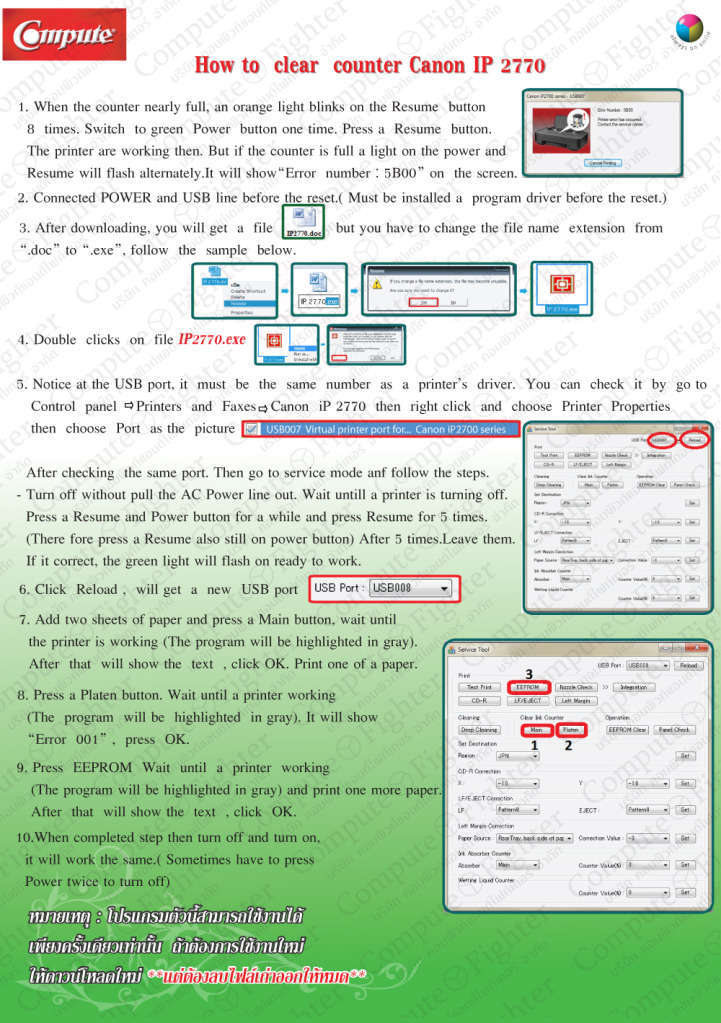
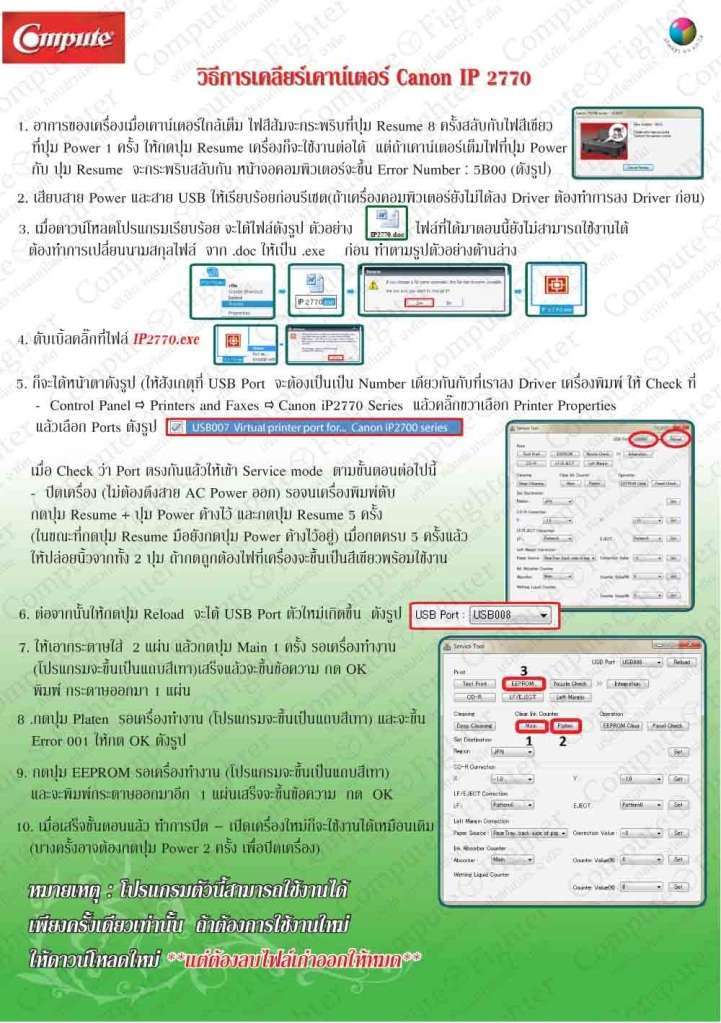
Here the tutorial reset for Canon ip2770 (Click the picture below to view the tutorial – the tutorial are is English and Thai language)
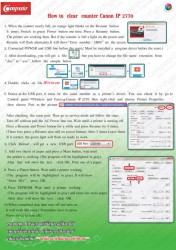
Tutorial Reset Canon iP2770 in English Language
Note: All Download link and tutorial is taken from Thailand printer forum (http://www.compute.co.th). Use this info and tutorial as your own risk. Here the download link software resetter for Canon iP2770: Canon iP2770 Resetter.

Senin, 30 September 2013

Solve Error 5200 Canon iP2770


Canon iP2770 printer is an economical printer and Canons latest output from the vendor. Like his brothers before, Canon iP2770 printer is also not immune from error problems lately started to emerge and much discussed, especially in cyberspace.


One problem is the iP2770 printer error 5200 on the exit time will start the print process. And if the calculated amount of 8x blinkingnya orange 1x green. How do I fix this?

Indications iP2770 error 5200:

At the iP2770 printer is turned on, this printer will initialize berkedipnya marked with green LED lights up green led is full. It looks normal printer iP2770 with this green LED turn on. But at the time of the test print or print the document, the printer suddenly stops and error 5200 appears on the screen we are. And the printer will have a blinking green orange 1x 8x.

Cause iP2770 error 5200:

This printer cartridge for black type PG810 and CL811 cartridges for color. Apparently the second cartridge has a pressure sensor temperature. And if the pressure sensor detects the temperature of one cartridge turns out there is a problem, then the iP2770 printer will display an error message 5200. on the screen. And in fact that is often problematic is the color cartridge CL811.


How to Solve Error 5200 Canon iP2770:

First way:

This method is the easiest way, but spend a lot of money that is by replacing the iP2770 the color cartridge error 5200, then the problem was resolved.

Second way:

IP2770 printer is turned off with an electric cord attached.
Press the RESUME button and hold 2 seconds, then press the POWER button until the green LED flame.
Then release the Resume button, but do not release the button POWER.
POWER button while still depressed, press the Resume button 5 times. Led will flash alternately orange glow green with orange last.
IMPORTANT: not to mistakenly press RESUME 4 times only, because the printer will die completely, but it is temporary. If this happens, disconnect the USB cable and power cord. Let stand for 2-4 hours, then try your printer.

Release both buttons simultaneously.
Green LED will flash briefly and then going full flame.
And the computer will detect new hardware, ignore it.
Press the POWER button, then the printer will die.
Press the POWER button again it will flame and iP2770 printers that had the error 5200 is ready for use again.
Oya iP2770 how to resolve error 5200 that we described, is temporary until power is removed. So if the power disconnected then the iP2770 will be error 5200 again. And how to overcome that is repeat the above steps.

Good luck!

Rabu, 16 Mei 2012

How To Service My Printer - MISS / CISS single printer installation guides

 
Step by step instructions
  1. Open the front cover
  2. open the ink cartridge locking cover, put the cartridge, close the cartridge locking cover
  3. Stick the tube using double side tape, use cable tie to tie up the tube, and cut the extra cable tie
  4. Stick the tube on the printer
  5. Do cleaning process to make sure perfect print
How To Service My Printer - MISS / CISS single printer installation guides


Rabu, 11 April 2012

Reset Canon Pixma IP2770 | Absorber Full | Error Code 5B00

Reset Canon Pixma IP2770 | Absorber Full | Error Code 5B00
 
 
STEP 1:  Entering Service Mode
You have to enter in service mode in order to used the resetter. To do that follow this procedure,

1. Turn off the printer without pulling the power cords.
2. Hold down Resume button and press Power button.
3. Keep holding down Power button and let Resume button go.
4. Then Press Resume button 5 times then let BOTH buttons go.
5. You will notice that the Alternate Blinking error is gone, this means that the printer is in Service Mode state.

STEPS 2: Using the Resetter

1. After you download the resetter, extract it and double click "servicetool.exe"
2. Press the "Main" Button, Then press "EEPROM Clear" button if a pop-up appear just click OK
5. Then power off the printer(sometimes you have to press twice the power button to turn off) and turn on again. and its done!